Python Lists
Python ki sabse useful data structure — List! Multiple items ek jagah store karo, access karo, modify karo!
What are Python Lists?
Simple samjho: List ek dabba hai jisme aap bahut saari cheezein rakh sakte ho — numbers, names, ya kuch bhi! Aur aap kabhi bhi koi item add, remove ya change kar sakte ho.
📦 Ordered
Items jis order mein daale, usi order mein rahte hain
✏️ Mutable
Items add, remove, change — sab kuch kar sakte ho
🔢 Indexed
Har item ka ek number (index) hota hai — 0 se shuru
🎨 Mixed Types
Ek list mein numbers, strings, booleans — sab rakh sakte ho
📏 Dynamic Size
List chhoti-badi ho sakti hai — fixed size nahi hai
# List banane ka tarika — square brackets [] use karo
fruits = ["apple", "banana", "cherry", "orange"]
print(fruits)  # ['apple', 'banana', 'cherry', 'orange']

# List mein kitne items hain?
print(len(fruits))  # 4
Types of Python Lists
# 1. Empty List — khaali list
empty = []
print(empty)           # []

# 2. Integer List — sirf numbers
numbers = [1, 2, 3, 4, 5]
print(numbers)         # [1, 2, 3, 4, 5]

# 3. Float List — decimal numbers
prices = [10.5, 20.3, 30.7]
print(prices)          # [10.5, 20.3, 30.7]

# 4. String List — text items
names = ["Rahul", "Priya", "Amit"]
print(names)           # ['Rahul', 'Priya', 'Amit']

# 5. Mixed List — sab kuch mix!
mixed = [1, "Hello", 3.14, True, None]
print(mixed)           # [1, 'Hello', 3.14, True, None]

# 6. Nested List — list ke andar list!
matrix = [[1,2,3], [4,5,6], [7,8,9]]
print(matrix[0])       # [1, 2, 3] (pehli row)
print(matrix[1][2])    # 6 (doosri row, teesra item)
List Kaise Banaye?
1. Direct Values De Kar
# Sabse simple tarika — [] mein values likho
fruits = ["apple", "banana", "cherry"]
numbers = [10, 20, 30, 40, 50]
2. list() Function Se
# String se list banao — har character alag item ban jaayega
letters = list("Python")
print(letters)  # ['P', 'y', 't', 'h', 'o', 'n']

# range() se numbers ki list banao
nums = list(range(1, 6))
print(nums)     # [1, 2, 3, 4, 5]

# Tuple se list banao
my_tuple = (10, 20, 30)
my_list = list(my_tuple)
print(my_list)  # [10, 20, 30]
3. List Comprehension — Ek Line Mein! ⭐
# Squares nikalo 1 se 5 tak — ek hi line mein!
squares = [x**2 for x in range(1, 6)]
print(squares)  # [1, 4, 9, 16, 25]

# Sirf even numbers filter karo
evens = [x for x in range(1, 11) if x % 2 == 0]
print(evens)    # [2, 4, 6, 8, 10]

# Names ko uppercase mein convert karo
names = ["rahul", "priya", "amit"]
upper = [n.upper() for n in names]
print(upper) # ['RAHUL', 'PRIYA', 'AMIT']List Items Access Kaise Kare?
fruits = ["apple", "banana", "cherry", "orange", "mango"]
#  Index:    0        1         2        3        4
# Neg idx:  -5       -4        -3       -2       -1

# Positive index — shuru se count karo
print(fruits[0])    # apple  (pehla item)
print(fruits[2])    # cherry (teesra item)

# Negative index — end se count karo
print(fruits[-1])   # mango  (last item)
print(fruits[-2])   # orange (second last)

# ❌ Index out of range — ye error dega!
# print(fruits[10]) # IndexError!List Slicing
list[start:stop:step] — start se shuru, stop se pehle ruk jaao!nums = [10, 20, 30, 40, 50, 60, 70, 80, 90]
# Basic slicing — [start:stop] (stop excluded!)
print(nums[2:5]) # [30, 40, 50] (index 2, 3, 4)
# Start se leke — [:stop]
print(nums[:4]) # [10, 20, 30, 40] (shuru se 3 tak)
# Kisi index se end tak — [start:]
print(nums[5:]) # [60, 70, 80, 90] (5 se end tak)
# Step ke saath — [start:stop:step]
print(nums[0:8:2]) # [10, 30, 50, 70] (har doosra item)
# Reverse karo! — [::-1]
print(nums[::-1]) # [90, 80, 70, 60, 50, 40, 30, 20, 10]
# Last 3 items
print(nums[-3:]) # [70, 80, 90]List Traverse Kaise Kare?
1. Simple for Loop
fruits = ["🍎 Apple", "🍌 Banana", "🍒 Cherry"]

for fruit in fruits:
    print(fruit)
# 🍎 Apple
# 🍌 Banana
# 🍒 Cherry
2. Index ke Saath (range + len)
fruits = ["Apple", "Banana", "Cherry"]

for i in range(len(fruits)):
    print(f"Index {i}: {fruits[i]}")
# Index 0: Apple
# Index 1: Banana
# Index 2: Cherry
3. enumerate() — Best Tarika! ⭐
fruits = ["Apple", "Banana", "Cherry"]

for index, fruit in enumerate(fruits):
    print(f"{index}. {fruit}")
# 0. Apple
# 1. Banana
# 2. Cherryenumerate() sabse clean tarika hai jab aapko index aur value dono chahiye!4. while Loop
fruits = ["Apple", "Banana", "Cherry"]
i = 0
while i < len(fruits):
    print(fruits[i])
    i += 1
List Operations
# ➕ Concatenation — Do lists jodo
list1 = [1, 2, 3]
list2 = [4, 5, 6]
combined = list1 + list2
print(combined)  # [1, 2, 3, 4, 5, 6]

# ✖️ Repetition — List repeat karo
repeat = [0] * 5
print(repeat)    # [0, 0, 0, 0, 0]

hello = ["Hi"] * 3
print(hello)     # ['Hi', 'Hi', 'Hi']

# 🔍 Membership — Check karo item hai ya nahi
fruits = ["apple", "banana", "cherry"]
print("banana" in fruits)      # True ✅
print("grape" in fruits)       # False ❌
print("grape" not in fruits)   # True ✅

# 📏 Length
print(len(fruits))  # 3

# 🔢 Min, Max, Sum
nums = [10, 5, 20, 15, 3]
print(min(nums))    # 3
print(max(nums))    # 20
print(sum(nums))    # 53
List Methods — Complete Guide
append(item)— End mein ek item add karofruits = ["apple", "banana"]
fruits.append("cherry") # End mein add
print(fruits) # ['apple', 'banana', 'cherry']extend(list)— Doosri list ke saare items add karofruits = ["apple", "banana"]
more = ["cherry", "orange"]
fruits.extend(more) # Saare items add
print(fruits) # ['apple', 'banana', 'cherry', 'orange']insert(index, item)— Kisi specific position par item daalofruits = ["apple", "cherry"]
fruits.insert(1, "banana") # Index 1 par daalo
print(fruits) # ['apple', 'banana', 'cherry']remove(value)— Pehli matching value hataofruits = ["apple", "banana", "cherry", "banana"]
fruits.remove("banana") # Pehla "banana" hatega
print(fruits) # ['apple', 'cherry', 'banana']pop(index)— Index se item nikalo aur wapas karofruits = ["apple", "banana", "cherry"]
removed = fruits.pop(1) # Index 1 ka item nikalo
print(removed) # banana
print(fruits) # ['apple', 'cherry']
last = fruits.pop() # Bina index = last item
print(last) # cherryclear()— Saare items hatao — list khaali karofruits = ["apple", "banana", "cherry"]
fruits.clear()
print(fruits) # [] (khaali!)sort()— Items ko order mein lagaonums = [5, 2, 8, 1, 9, 3]
nums.sort() # Chhote se bade
print(nums) # [1, 2, 3, 5, 8, 9]
nums.sort(reverse=True) # Bade se chhote
print(nums) # [9, 8, 5, 3, 2, 1]reverse()— Items ko ulta karofruits = ["apple", "banana", "cherry"]
fruits.reverse()
print(fruits) # ['cherry', 'banana', 'apple']copy()— List ki copy banaooriginal = [1, 2, 3]
copy_list = original.copy()
copy_list.append(4) # Copy mein add karo
print(original) # [1, 2, 3] (original safe!)
print(copy_list) # [1, 2, 3, 4]index(value)— Item ka index number bataofruits = ["apple", "banana", "cherry"]
pos = fruits.index("banana")
print(pos) # 1count(value)— Item kitni baar hai — count karonums = [1, 2, 3, 2, 4, 2, 5]
print(nums.count(2)) # 3 (teen baar hai!)MCQ Quiz — Test Your Knowledge!
10 important MCQs — Python Lists ke concepts test karo! 📋
Python List mein elements ka order maintain hota hai ya nahi?
List mein elements change kar sakte hain ya nahi?
fruits = ["apple", "banana", "cherry"] fruits[1] ka output kya hoga?
fruits[-1] kya return karega?
append() aur extend() mein kya fark hai?
nums = [1,2,3] nums.insert(1, 10) print(nums) ka output?
pop() aur remove() mein kya fark hai?
nums = [3,1,4,1,5] nums.sort() print(nums) ka output?
List slicing mein nums[1:4] kya return karega? nums = [10,20,30,40,50]
List comprehension kya hai?
Practice Questions — Khud Karo! 💪
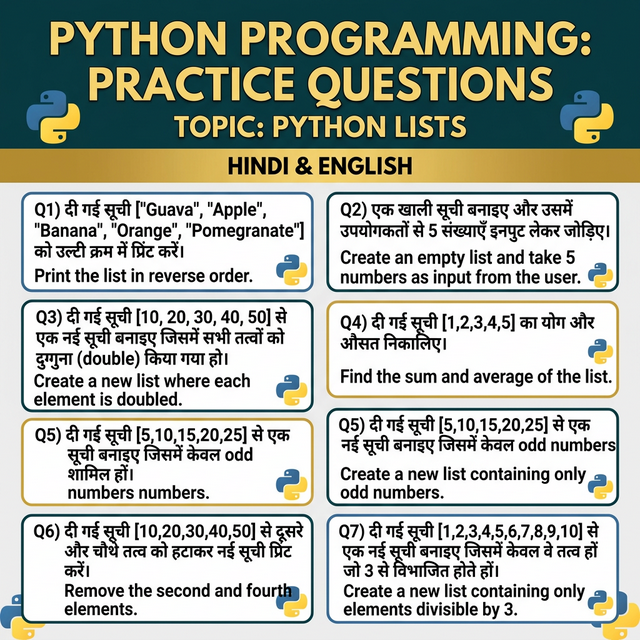
दी गई सूची ["Guava", "Apple", "Banana", "Orange", "Pomegranate"] को उल्टी क्रम में प्रिंट करें।
Print the list in reverse order.
एक खाली सूची बनाइए और उसमें उपयोगकर्ता से 5 संख्याएँ इनपुट लेकर जोड़िए। इसके बाद सूची के सभी तत्वों को प्रिंट करें।
Create an empty list and take 5 numbers as input from the user. Then print all elements.
दी गई सूची [10, 20, 30, 40, 50] से एक नई सूची बनाइए जिसमें सभी तत्वों को दुगुना (double) किया गया हो।
Create a new list from [10, 20, 30, 40, 50] where each element is doubled.
दी गई सूची [1,2,3,4,5] का योग (sum) और औसत (average) निकालिए।
Find the sum and average of the list [1,2,3,4,5].
दी गई सूची [5,10,15,20,25] से एक नई सूची बनाइए जिसमें केवल odd numbers शामिल हों।
From [5,10,15,20,25], create a new list containing only odd numbers.
दी गई सूची [10,20,30,40,50] से दूसरे और चौथे तत्व को हटाकर नई सूची प्रिंट करें।
From [10,20,30,40,50], remove the second and fourth elements and print the new list.
दी गई सूची [1,2,3,4,5,6,7,8,9,10] से एक नई सूची बनाइए जिसमें केवल वे तत्व हों जो 3 से विभाजित होते हों।
From [1,2,3,4,5,6,7,8,9,10], create a new list containing only elements divisible by 3.